
Explore the complete Scrum Sprint lifecycle — from planning to retrospective. Learn about key artifacts like Product Backlog, Sprint Backlog, Increment, and Burndown Chart with real-world examples
🌟 Introduction
Ever wondered how Agile teams keep delivering high-quality products sprint after sprint — without chaos or burnout?
The secret lies in the Scrum Sprint lifecycle.
A Sprint is the heartbeat of Scrum — a short, focused cycle where teams turn ideas into working, valuable product increments. Each sprint is time-boxed (typically 1–4 weeks) and includes everything from Sprint Planning to Sprint Retrospective. In this article, we’ll walk through every phase, the key artifacts (Product Backlog, Sprint Backlog, Increment, Burndown Chart), and real-world examples to help you see how it all fits together
🧭 What Is a Scrum Sprint?
A Scrum Sprint is a fixed-length iteration where a Scrum Team commits to delivering a specific set of features or improvements.
Think of it as a mini-project within a project — with its own planning, execution, review, and reflection.
🔁 Typical Sprint Duration
- 1 week: Fast feedback for startups or prototyping teams.
- 2 weeks: Most common — balance of speed + stability.
- 4 weeks: Larger, complex enterprise projects.
🎯 Goal of a Sprint
To deliver a Potentially Shippable Increment (PSI) that adds business value — something usable, testable, and ready for release.
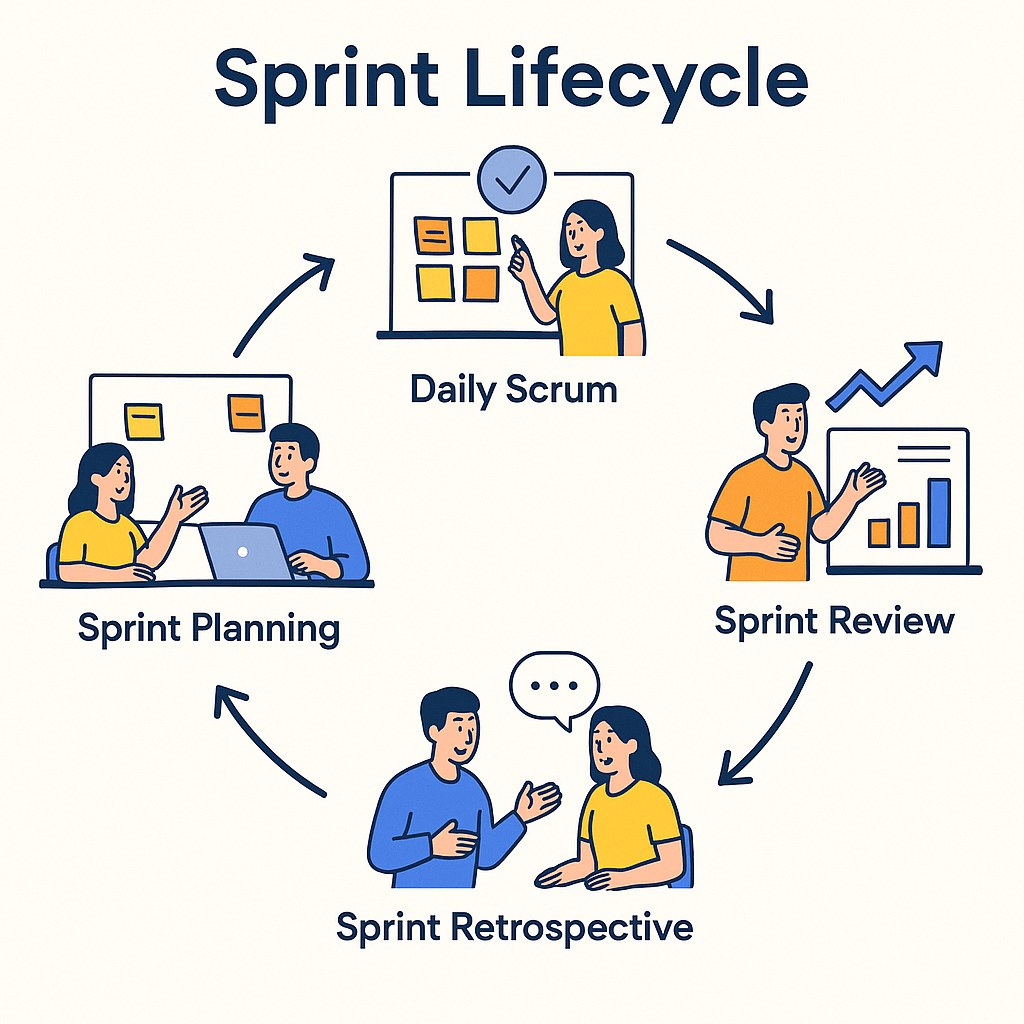
🧩 The 4 Major Phases of a Scrum Sprint
Sprint Planning — Setting the Direction
Objective: Decide what will be built and how it will be achieved.
The Product Owner brings the prioritized Product Backlog. The Development Team estimates capacity and effort. Together, they define a Sprint Goal — a short statement that captures the essence of the Sprint.
🪄 Example
- Sprint Goal: “Enable users to reset their passwords via email.”
- Selected Backlog Items:
- Build ‘Forgot Password’ screen
- Create password-reset email template
- Integrate backend API for token validation
✅ Benefits
- Shared vision and accountability
- Predictable delivery
- Focused progress
Daily Scrum — Keeping Everyone in Sync
Objective: Inspect progress and adapt the plan daily.
The Daily Scrum (aka Daily Stand-up) is a 15-minute meeting where each team member answers three questions:
- What did I accomplish yesterday?
- What will I work on today?
- Are there any blockers?
🧠 Example
- Yesterday: Integrated backend API.
- Today: Write unit tests for password module.
- Blocker: Pending review on API documentation.
💡 Tip Hold the meeting at the same time and place daily. Keep it short, visual, and action-oriented
Sprint Review — Show and Tell
Objective: Demonstrate completed work and gather feedback.
At the end of the Sprint, the team showcases the Increment to stakeholders. This is not a status meeting — it’s a collaboration forum to inspect and adapt the product backlog.
🧪 Example
- The team demonstrates the password-reset flow live.
- Stakeholders test it and suggest adding a confirmation screen.
- The Product Owner updates the Product Backlog accordingly.
🏆 Benefits
- Builds transparency and trust.
- Reduces rework by early feedback.
- Keeps stakeholders engaged.
Sprint Retrospective — Continuous Improvement
Objective: Reflect on process and team dynamics.
The Scrum Team discusses what went well, what didn’t, and how to improve in the next sprint.
🎯 Example (Start / Stop / Continue)
| Category | Example Action |
| Start | Using a Definition of Ready checklist |
| Stop | Overcommitting backlog items |
| Continue | Pair-programming complex tasks |
💬 Output Concrete improvement actions — e.g., “From next sprint, conduct story-point estimation earlier
🧱 Core Tools & Artifacts in a Scrum Sprint
Artifacts are the visible representations of work, progress, and value in Scrum. They bring transparency and alignment across the team. Let’s explore each one — with examples 👇
Product Backlog — The Master To-Do List
Definition:
An ordered, evolving list of everything that might be needed in the product, maintained by the Product Owner.
🧩 Example
| ID | User Story | Priority | Story Points | Status |
| PBI-1 | As a user, I want to reset my password via email. | High | 5 | Ready |
| PBI-2 | As an admin, I want to view login attempts. | Medium | 8 | Refining |
| PBI-3 | As a user, I want multi-factor authentication. | Low | 13 | Backlog |
🛠️ Tools
- Jira Software
- Azure DevOps
- Trello
- ClickUp
💡 Tips
- Continuously refine (Backlog Grooming).
- Keep items INVEST: Independent, Negotiable, Valuable, Estimable, Small, Testable.
Sprint Backlog — The Team’s Commitment
Definition:
A subset of the Product Backlog selected for the current Sprint, plus a plan to deliver it. Owned by the Development Team.
🧩 Example
| Sprint Goal | “Enable password reset and validation flow.” |
| Sprint Items | UI screens, API integration, Email template |
| Tasks | Create UI mockup (4 hrs), Write unit tests (3 hrs), Deploy to staging (2 hrs) |
🧭 Visualization
A Kanban-style Sprint Board showing task flow:
To Do → In Progress → Code Review → Done ✅
🛠️ Tools
- Jira Scrum Board
- Notion Kanban View
- Monday.com Sprint Board
💡 Benefits
- Daily visibility of work.
- Team self-management.
- Clear scope control.
Increment — The Outcome
Definition:
The sum of all Product Backlog items completed during the Sprint plus previous increments — forming a usable product.
🧩 Example
After Sprint 2, the Increment includes:
- Login + Signup flow (from Sprint 1)
- Password Reset feature (from Sprint 2)
- Both combined form a deployable version 1.1
Each Increment must meet the Definition of Done (DoD) — meaning it’s fully coded, tested, documented, and deployable.
💡 Benefits
- Continuous delivery of working software.
- Builds stakeholder confidence.
- Simplifies release planning
Burndown Chart — Visualizing Progress
Definition:
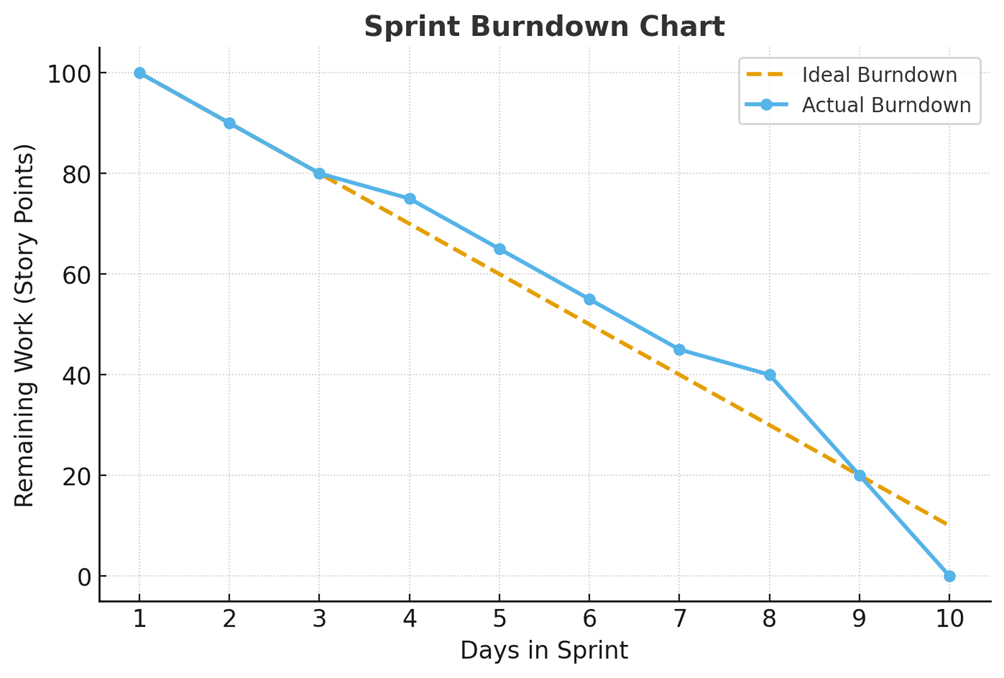
A graph showing the remaining work (on the Y-axis) versus time (on the X-axis). It helps the team see whether they’re on track to finish the Sprint.
🧩 Example
Imagine a 10-day Sprint with 100 story points. Each day, completed points are subtracted:
Day 1 = 90 left, Day 5 = 45 left, Day 10 = 0 🎉
🧠 Insights
- If the line is above the ideal → team behind schedule.
- If below → ahead or underestimated.
- Combine with velocity tracking to forecast delivery.
🛠️ Tools
- Jira Burndown Report
- Excel or Google Sheets
- Miro Dashboard
🔮 Future Trends in Scrum Execution
Scrum isn’t static — it’s evolving with technology and culture.
1. AI-Powered Sprint Assistants
AI tools (like Jira Intelligence or ChatGPT-based plugins) can estimate story points, identify blockers, and draft retrospectives automatically.
2. Hybrid Scrum + Kanban (Scrumban)
Many enterprises adopt hybrid models to combine the structure of Scrum with the flow of Kanban.
3. Data-Driven Agile Coaching
Real-time metrics dashboards track psychological safety, velocity variance, and feedback loops — improving team health beyond delivery metrics.
4. Value-Based Metrics Teams now measure success not by story points, but by business outcomes — conversion rates, user satisfaction, or revenue impact
💬 Conclusion
A well-orchestrated Scrum Sprint is more than a checklist of meetings — it’s a living rhythm of teamwork, transparency, and value creation.
From Sprint Planning to Retrospective, each step — and each artifact — plays a critical role in ensuring success.
When teams master these cycles, they don’t just deliver software — they deliver continuous value and learning. “Scrum transforms teams not by rules, but by reflection and rhythm